ServeWay™. Equipping your church to serve.
“According to the Way… I worship the God of our fathers.” (Acts 24:14, ESV)
Helping your church serve Christ and each other.
Full features for 45 days · Windows 11 Pro · ServeWay™ is beta software
No credit card required to start.
- Google Calendar
- WordPress
- OBS Studio
- Tithe.ly
- Twilio
- Brevo
- MUX.com · YouTube · Facebook · Vimeo
Added to Google Calendar
Updated 9:05 AM
Server and key set
Every number comes from the ServeWay™ user manual, source code or published pricing.
Update once. Everywhere knows.
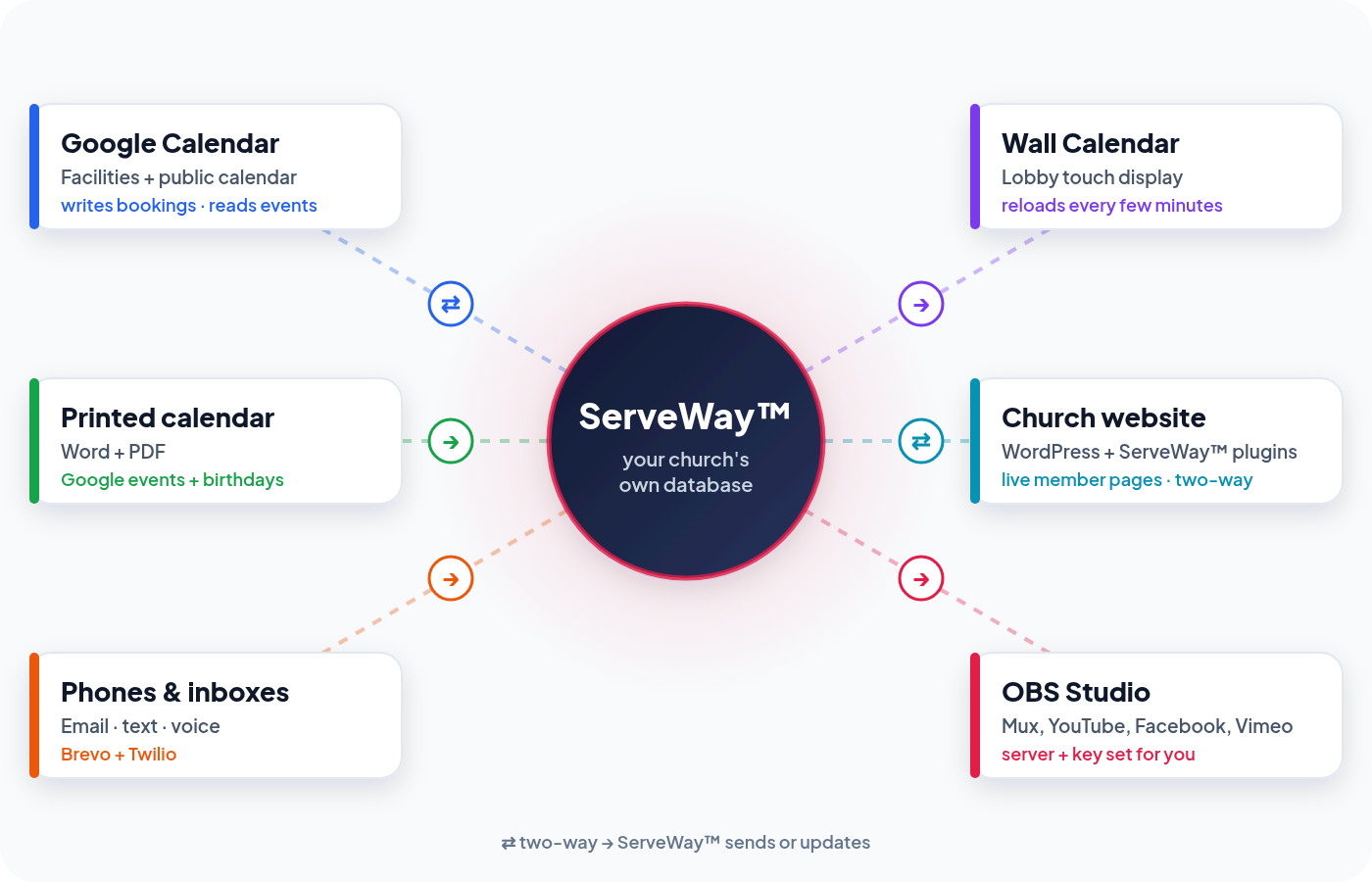
You enter it once. ServeWay™ takes care of getting it to your Google Calendar, your lobby screen, your website and your live stream.
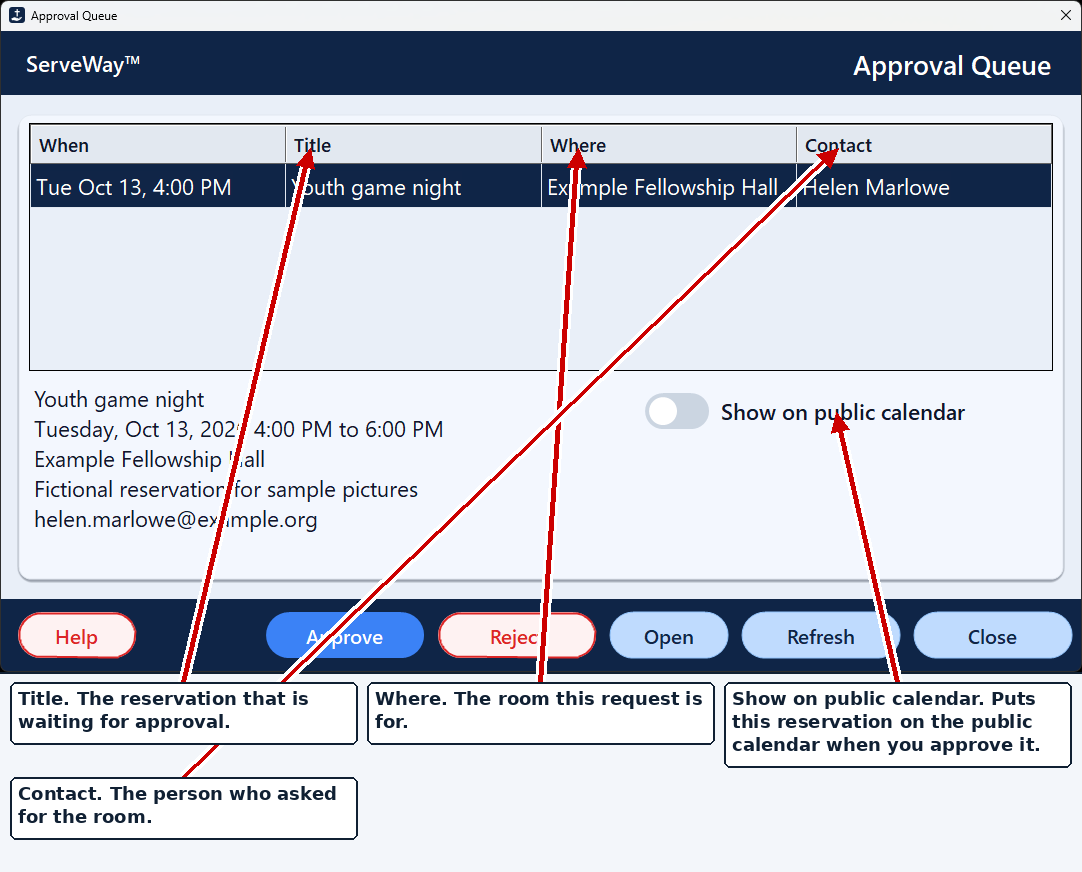
Approve a room, and it's on Google Calendar
Approved bookings go to your Facilities calendar, and to the public church calendar if you check the box. Edits update the event, and cancellations remove it.
The lobby Wall Calendar keeps itself current
It reloads your public Google Calendar and ServeWay™ church events as often as you choose.
Your website works with ServeWay™
Sunday's sermon goes to your website
Save Stream To Website fills in the details, finds the recording and publishes it to your sermon library.
OBS is set for the right service
Switch between MUX.com, YouTube, Facebook or Vimeo, and ServeWay™ sets the OBS server and key. It never changes a stream that’s already live.
| From → To | Direction | When |
|---|---|---|
| Room approvals → Google Calendar (facilities + public) | ServeWay™ writes, updates, removes | On approve, edit or cancel |
| Google public calendar + ServeWay™ events → Wall Calendar | Read | Every few minutes (you set it) |
| Google Calendar + birthdays → monthly calendar (Word/PDF) | Read | When you press Create |
| ServeWay™ ↔ website member pages (ServeWay™ plugin) | Reads and saves member info | When a member opens or saves a page |
| Recording + sermon details → WordPress sermon library | ServeWay™ publishes | When you press Upload |
| Active streaming service → OBS Studio | ServeWay™ writes server + key | When OBS connects, when the service changes, and before Start Streaming |
On a phone, swipe the table sideways.
Takes the repetitive steps off your staff's plate.
ServeWay™ doesn’t replace your people. It handles the re-typing, copy-and-paste and double entry, so staff and volunteers can spend their time on ministry.
Good to know: ServeWay™ runs on your church’s own PC, not in a vendor’s cloud. Automatic jobs, like emailed notification requests, Google Calendar updates and Wall Calendar refreshes, run while at least one ServeWay™ PC is on and running ServeWay™. We recommend an always-on ServeWay™ PC on a UPS (battery backup), and our pre-built systems can include one.
as part of the normal work
- Approved room bookings are added to Google Calendar
- Booking changes and cancellations update or remove calendar events. Time or room changes go back for approval
- Email notices go to approvers and requesters at each step
- The Wall Calendar reloads events on your schedule and returns to the current month after idle
- OBS gets the right server and stream key for the active service
- An emailed, PIN-protected notification request goes out as email, text and voice
- Website member pages show live ServeWay™ data, and member updates flow back
- Monthly calendar in Word and PDF, from Google Calendar plus birthdays and anniversaries
- Sermon notes in Word, PDF and PowerPoint, from the web form
- Prayer-list PowerPoint, plus prayer requests read in from email
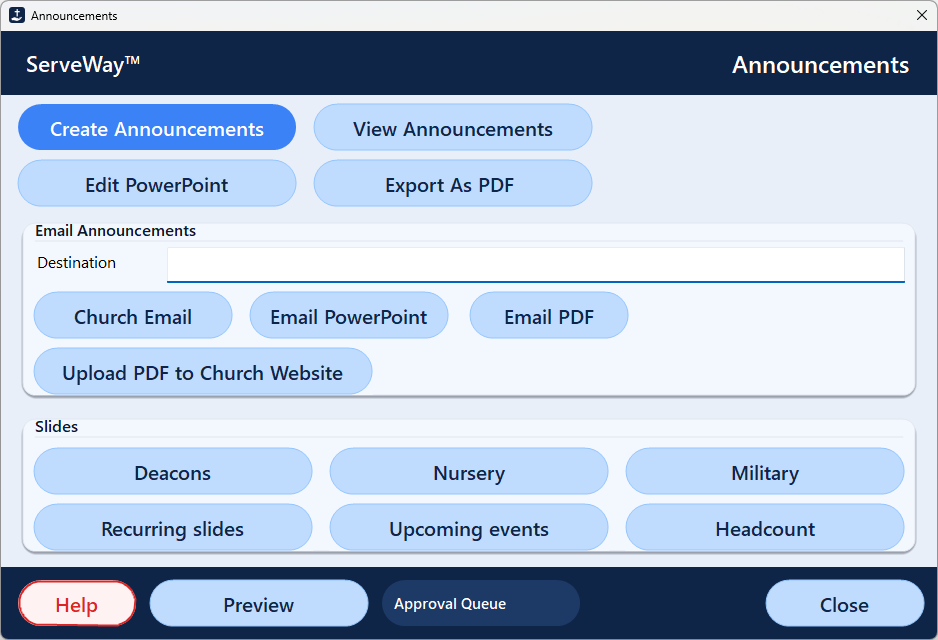
- Announcement slides and handout, with the PDF uploaded to your website
- Sermon recording and details published to your website
- Check and envelope scans read: amount, memo, check number, fund split, name
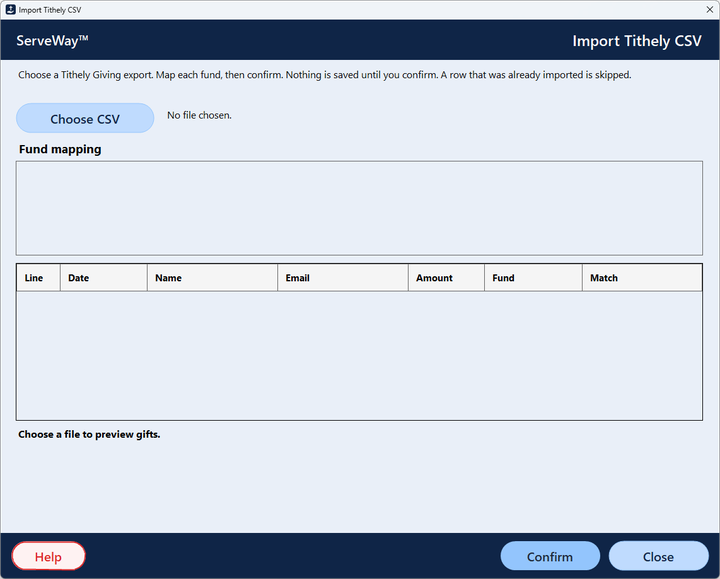
- Tithe.ly gift import. Re-importing a file skips gifts already saved
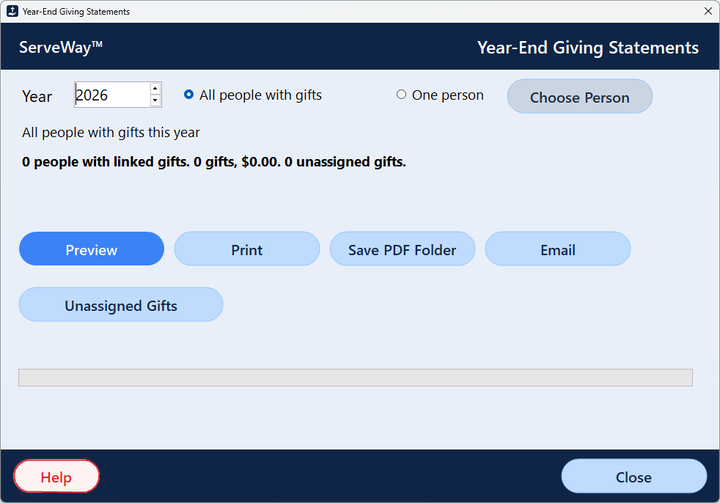
- Year-end giving statements for everyone: print, PDF or email
- Child and pickup labels with a matching six-digit number
- Page Parent texts a parent from the nursery, with the pickup code
- Church directory PDF, ready to print or email
Pay once. Keep it.
Subscription software bills you every month for as long as you use it. Here is a church of about 250 people over five years, using each vendor’s own published prices.
Estimated 5-year cost
Prices checked Oct 5, 2026 from each vendor’s pricing page, and they can change. Planning Center: Check-Ins 75 ($32) + Calendar 5 rooms ($15) + Groups 200 ($32) + Giving 200 donations ($32); People is free. Realm by ACS publishes Inform (staff-only) at $49/mo, and its Connect plan is quote-only. Rock RMS is free for faith-based organizations, but you pay for your own server or hosting.
Show me the math
ServeWay™: $99 + (4 × $49) = $295
Breeze: $72 × 60 months = $4,320$4,025 less with ServeWay™
Planning Center: $111 × 60 = $6,660$6,365 less with ServeWay™
To be fair, those subscriptions include things ServeWay™ doesn’t, such as hosted online-giving processing, worship planning and mobile apps. ServeWay™ needs a Windows 11 Pro PC, desktop Microsoft Office and a free database. ServeWay™ can download and install that database (MariaDB) on the same PC for you. Twilio texts, Brevo email over 300 a day, MUX.com streaming and Tithe.ly giving fees are billed by those companies only if you use them.
- Check-in & labels
- Lobby Wall Calendar
- Live-stream helper
- Printable & online directory
- Prayer, sermon & announcement slides
- Room booking & approvals
- Email, text & voice
We don't SaaS you™.
Yours to keep. Not rented. No monthly bill for the ServeWay™ application.* ServeWay™ isn’t SaaS. You own the license, and your church owns its data.
* The ServeWay™ license is a one-time purchase. Optional services are billed monthly by those providers if your church chooses to use them: Twilio for text and voice notifications, an AI company for AI features, and paid database hosting, including Hosted by ServeWay™.
Pay once, keep it
The lifetime license keeps working whether or not you renew. Renewal ($49 or $99 a year) only adds another year of updates and help.
No per-member fees
No price tiers for people, check-ins, donations or rooms. Grow as much as you like.
Your data, your database
People, giving and check-in records live in your church's own database, not in a vendor's cloud. ServeWay™ can install that database (MariaDB) for you on your church PC, or you can connect to a MySQL or MariaDB database on your own server or web host.
Runs on your own PC
People, check-in, labels and offering run on your PC and your database. Google Calendar, email and text, and streaming use the internet. Automatic jobs run while a ServeWay™ PC is on, so keep one always on, ideally on a UPS (battery backup).
Privacy built in
Members see only their own household. Families choose what the directory shows. Passwords are salted hashes. Check reading never sends account or bank numbers.
No lock-in
Back up your settings to a file, and move your license to a new PC with our help. Source code and a Programming Reference are available under NDA.
How ServeWay™ compares
We list only what each company publishes. “Not published” means we couldn’t find it on their public pages. It does not mean the product can’t do it. Checked October 5, 2026.
On a phone or tablet, swipe the table sideways to see every product.
| ServeWay™ | Planning Center | Breeze | ChurchTrac | Elvanto | Rock RMS | |
|---|---|---|---|---|---|---|
| Pricing model | One-time license | Monthly, per product | Monthly, flat | Monthly, by names | Monthly, by active adults | Free license; you host it |
| Published price (~250 people) | $99 once | $111/mo (4 products) | $72/mo | $59/mo | $62.40/mo + $149 setup | $0 license; hosting not published |
| Estimated 5-year cost | $99 to $295 | $6,660 | $4,320 | $3,540 | $3,893 | Not published |
| Where your data lives | Your own database, on your PC (ServeWay™ can install it) or your own server | Vendor cloud | Vendor cloud | Vendor cloud | Vendor cloud | Your server or a hosting partner |
| Check-in with label printing | ✓ Yes | ✓ Check-Ins | ✓ Name tags | ✓ Check-in included | ✓ Yes | ✓ Yes |
| Lobby wall-calendar display | ✓ Touch, 4K-aware, themes | Not published | Not published | Not published | Not published | Not published |
| Google Calendar | ✓ Reads it and writes approved bookings to it | One-way iCal feed (Google refreshes in 2 hrs to 5 days) | Not published | Not published | Not published | Not published |
| Church website | ✓ Member pages through the ServeWay™ WordPress plugin | Church Center site/app | Not published | Website & app included | Not published | Built-in website CMS |
| Streaming / OBS | ✓ Sets OBS for 4 services; posts recordings | Not published | Not published | Not published | Not published | Not published |
| Giving | Check/cash entry with scan reading + Tithe.ly import | Planning Center Giving | Giving included (Tithely) | ChurchTrac Giving | Not published | Finance tools |
| Automations | ✓ 18 built-in jobs (7 automatic)* | Not published | “Automation & Follow Ups” | “Automations” | Not published | Workflows |
| Runs on your own PC/network | ✓ Windows + your database* | Web service | Web service | Web service | Web service | Self-host option (Windows Server + SQL Server) |
| Source code | ✓ Under NDA, one-time fee | Not published | Not published | Not published | Not published | Source available (Rock Community License) |
* ServeWay™ automations run on your church’s own PC, not a vendor’s cloud. They work while at least one ServeWay™ PC is powered on and running ServeWay™. We recommend an always-on ServeWay™ PC on a UPS (battery backup). Cloud services run on the vendor’s servers instead.
Sources: planningcenter.com/pricing, help.planningcenter.com, breezechms.com/pricing, churchtrac.com/pricing, elvanto.com/pricing, elvanto.com/features/all/child-check-in, buy.acst.com/realm-inform, rockrms.com/license, community.rockrms.com/rock-technical-requirements. Competitor prices change, so check them before you decide.
Real screens, not mock-ups
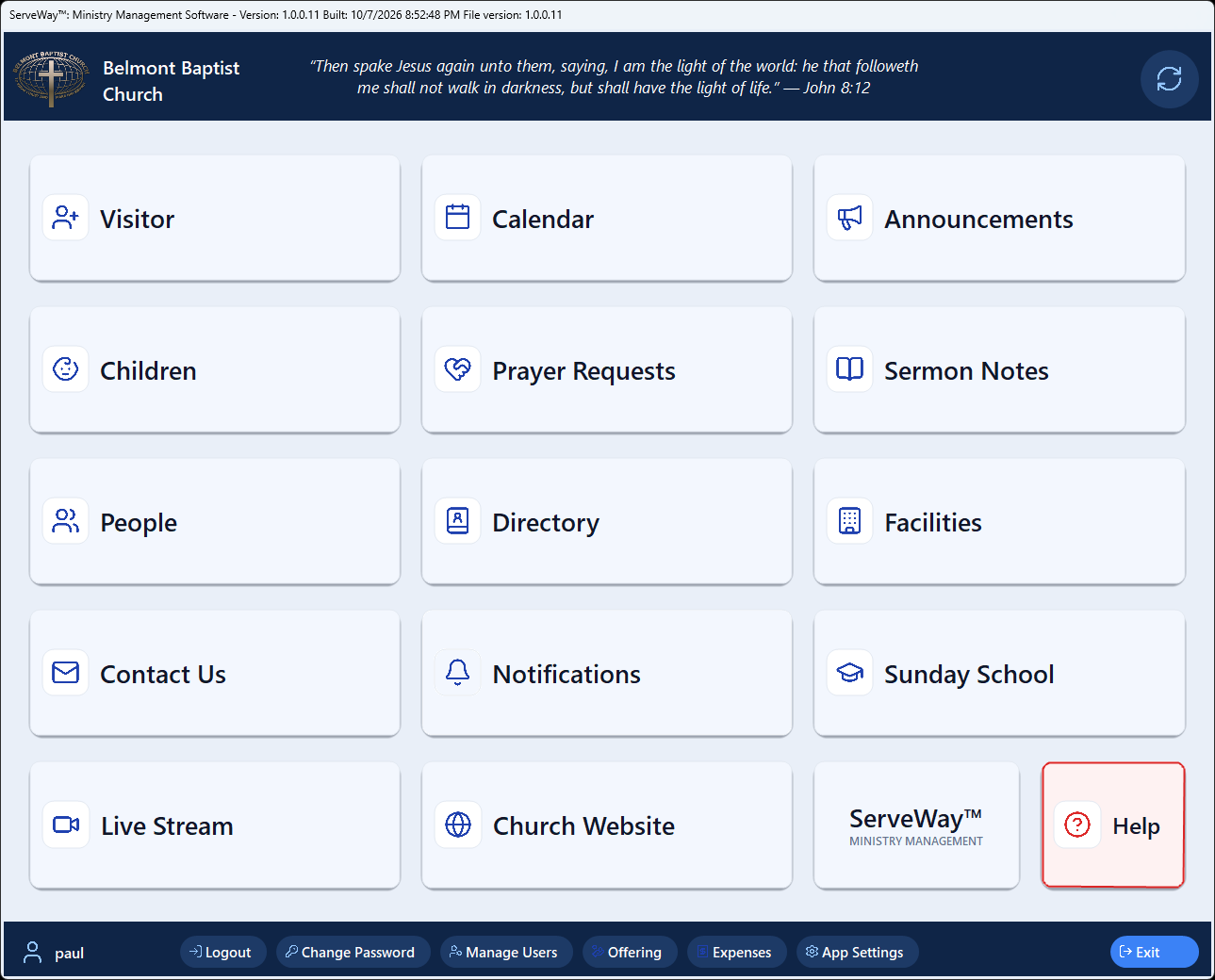
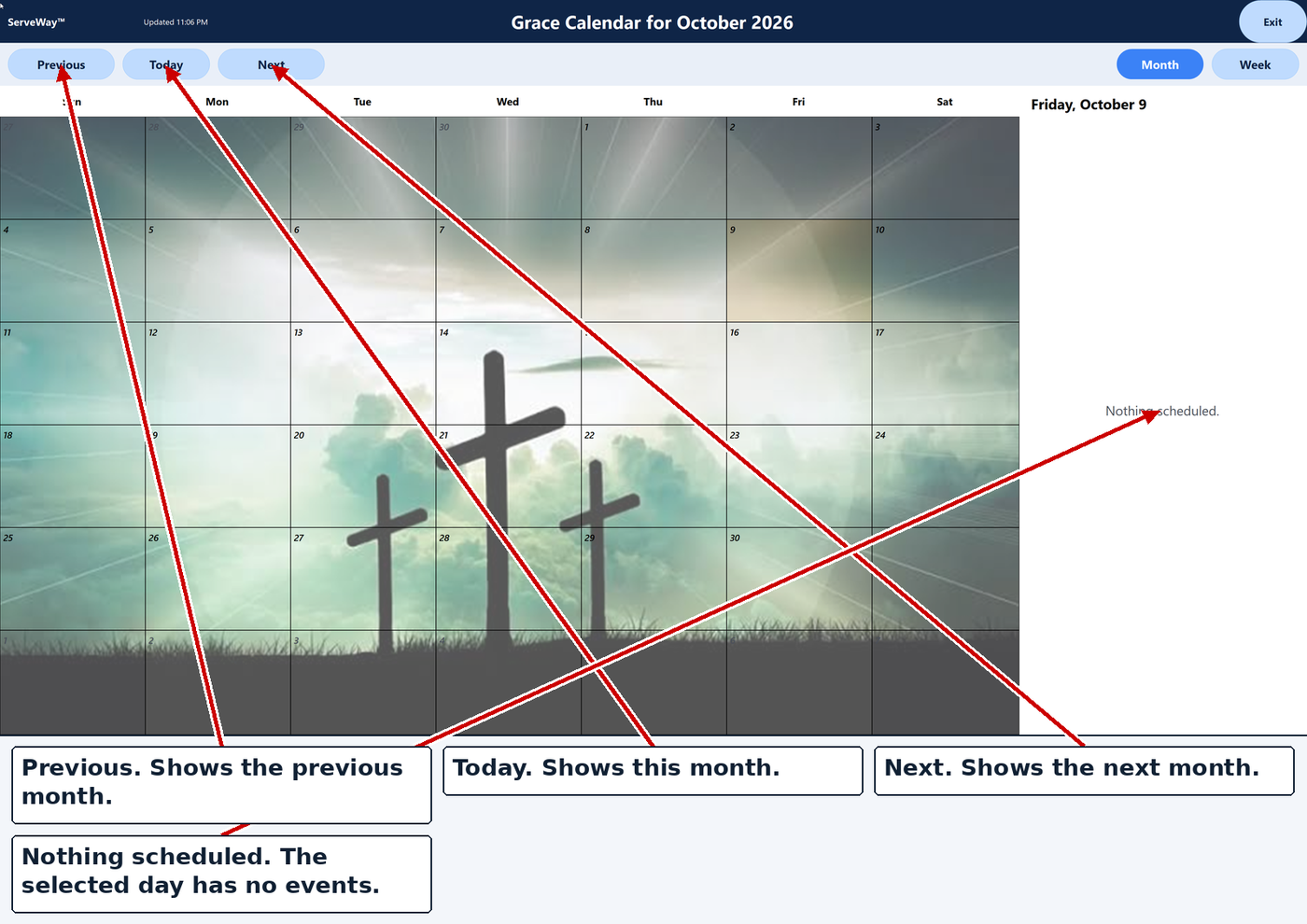
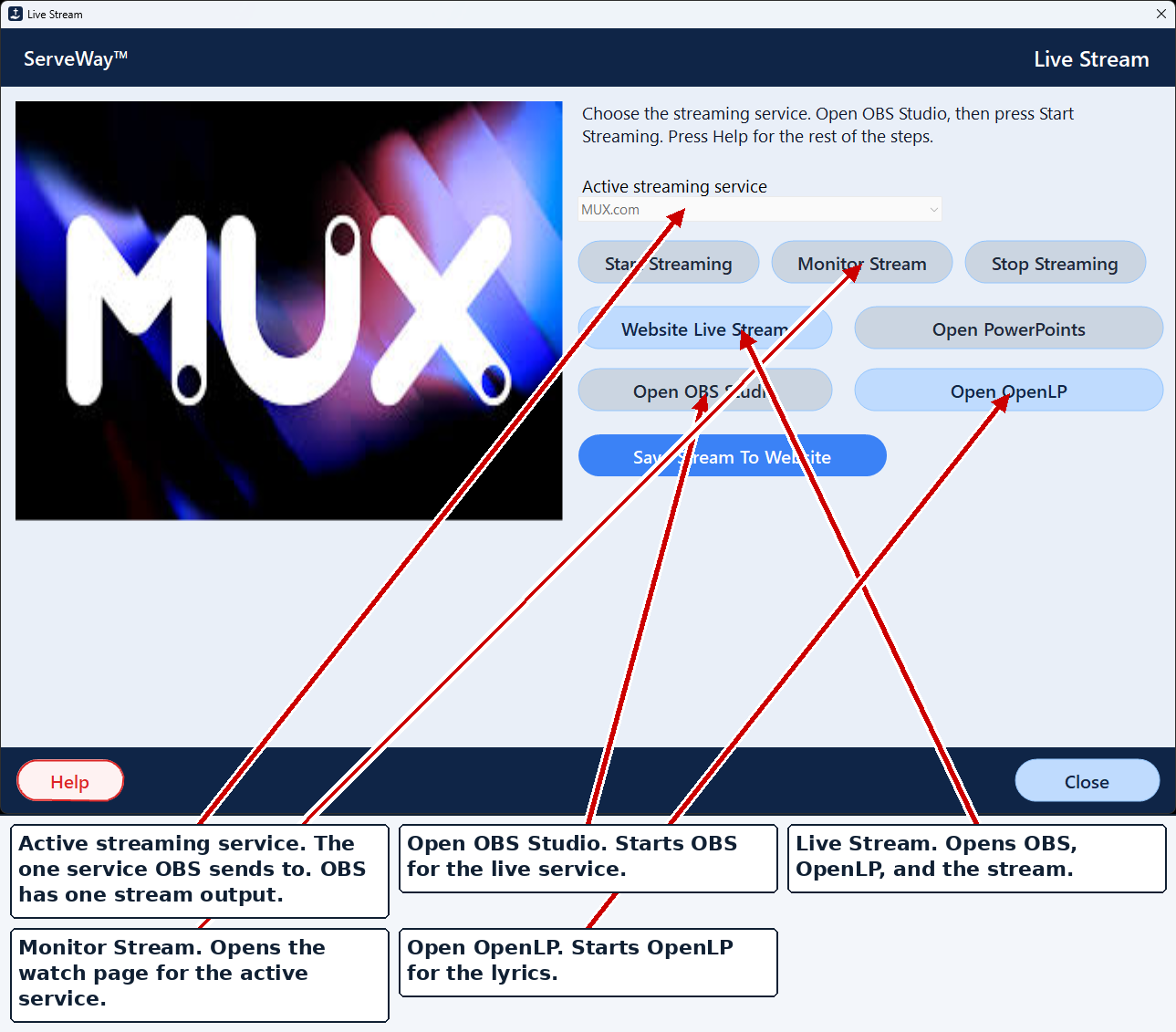
Screens from a recent Windows 11 build, shown with a sample church.
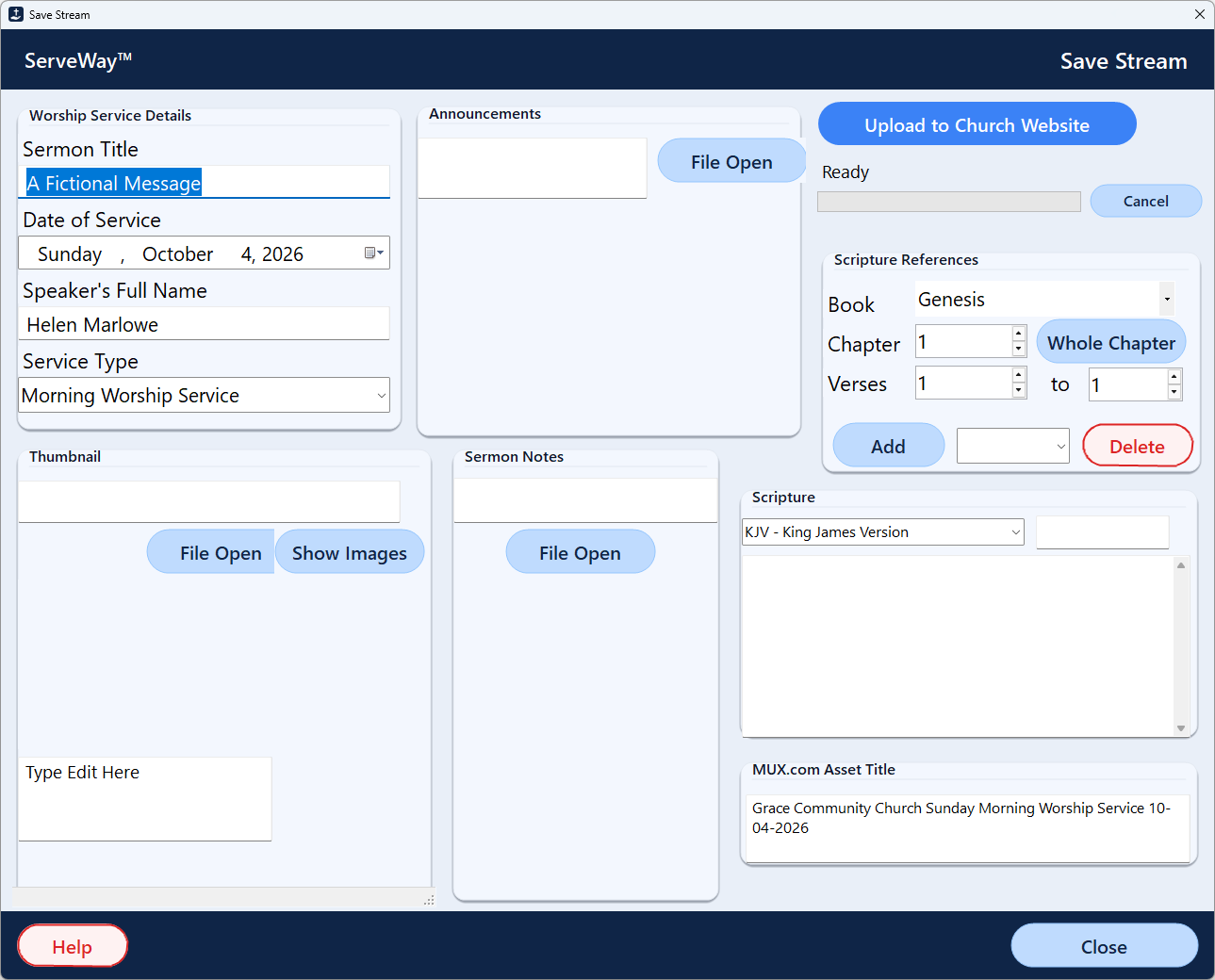
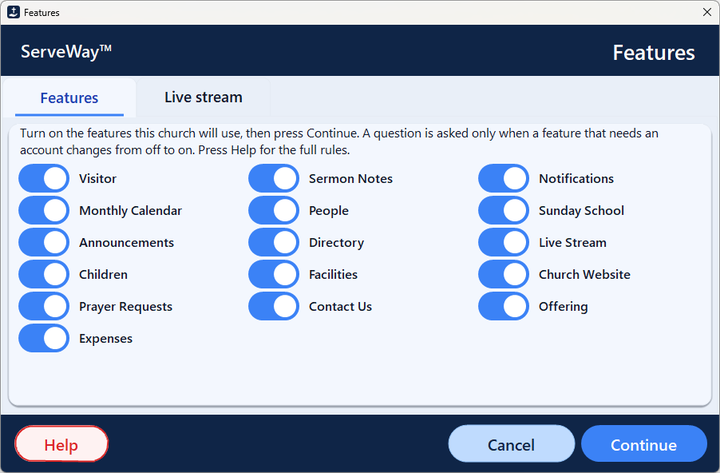
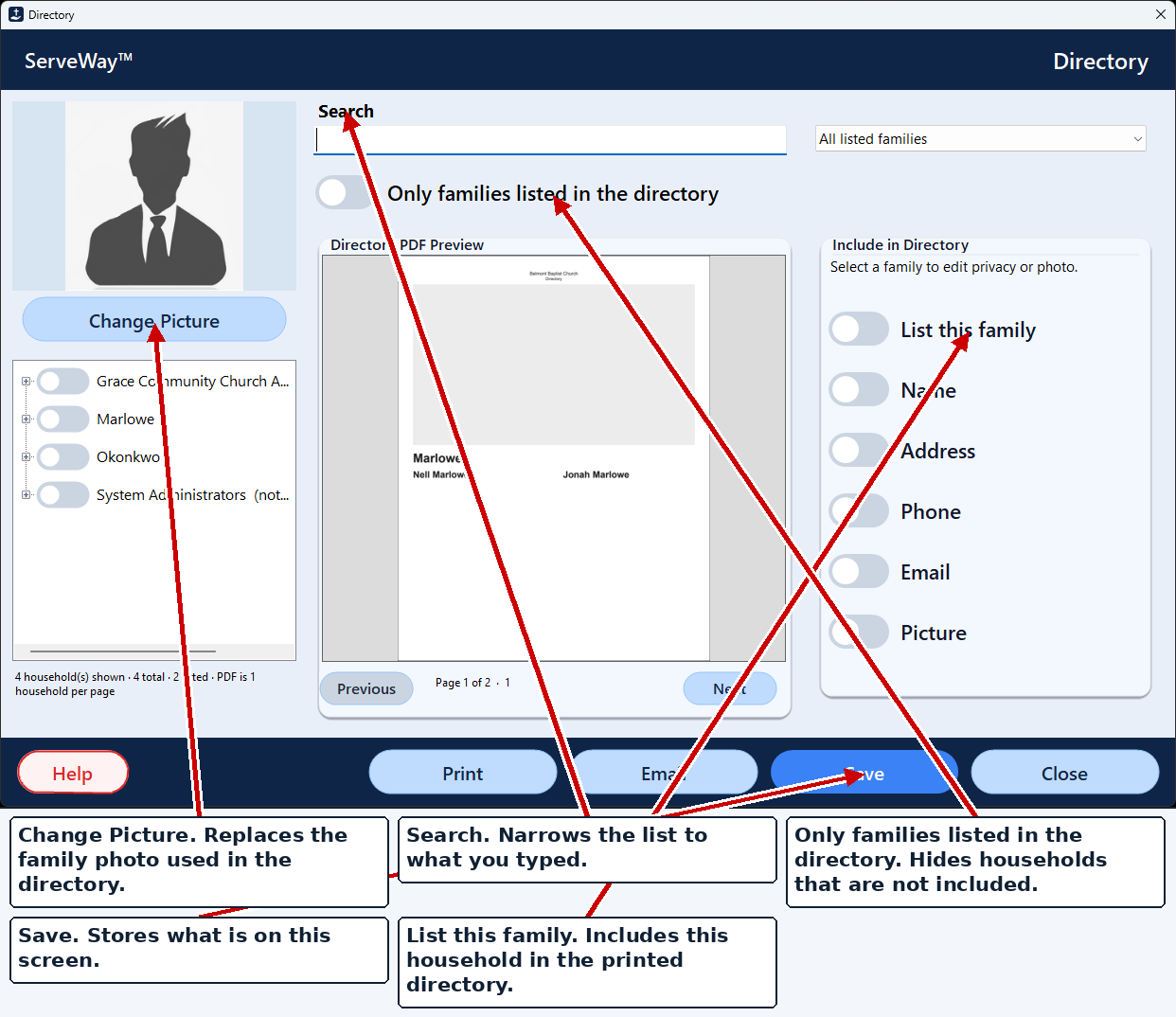
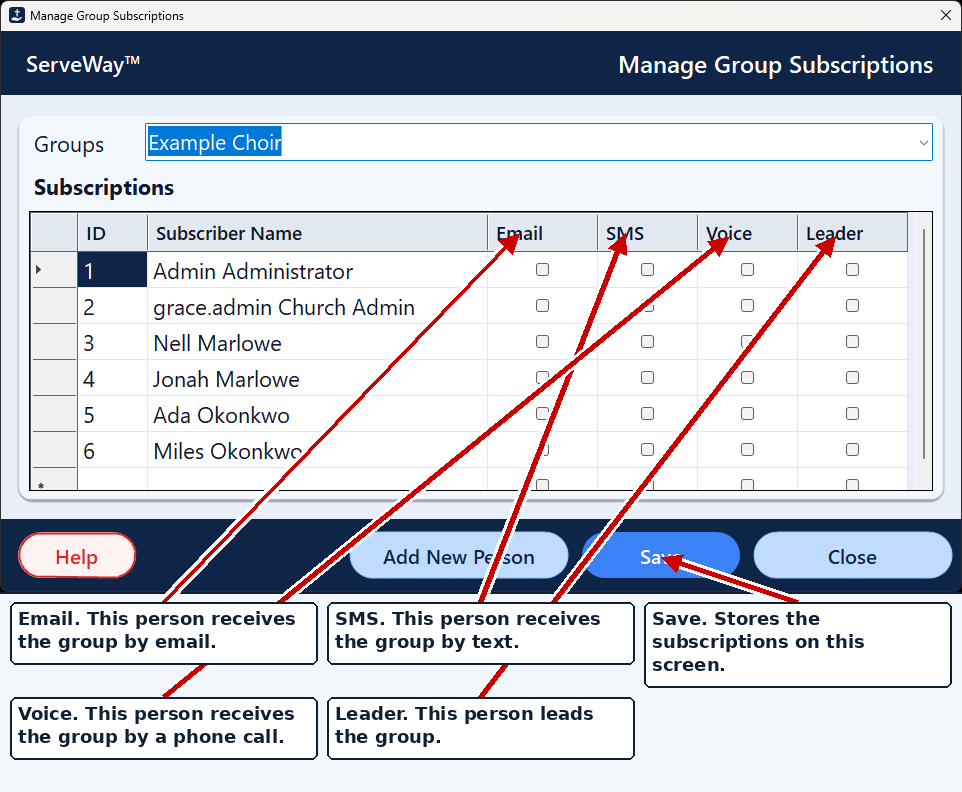
Everything a Sunday needs, in one place
Check-in kiosks with labels
Allergies, photos, authorized pickups, and child and pickup labels with a matching six-digit number. Page Parent texts a parent from the nursery.
Lobby Wall Calendar
Full-screen touch calendar with Month or Week view, Light, Dark or Match Windows themes, your own wallpaper, and type that scales up on 4K. Tap an event for details.
Live streaming made simpler
Opens OBS, OpenLP and your PowerPoints. Sets OBS for MUX.com, YouTube, Facebook or Vimeo, and posts the recording to your website.
Giving, the way you do it
Scan a check and envelope together, split gifts across funds, import Tithe.ly online gifts, and send year-end statements. Online giving is through Tithe.ly.
Notifications that reach people
Email (Brevo), and text and voice (Twilio), to as many groups as you need. Each person picks email, text or voice for each group.
Directory with family privacy
A printable PDF directory built from households. Each family chooses what is shown.
Member pages on your website
Household self-service, a members-only directory, private group pages, event RSVPs, serving schedules and the prayer list.
Rooms and approvals
Request, approve or reject. Conflicts are caught before a double booking, and approved rooms go to Google Calendar.
Sermons, prayer, announcements
Sermon notes in Word, PDF and PowerPoint, prayer-list slides, and announcement slides and handouts.
Sunday School and people
Classes, teachers, rosters, attendance, and absentee and “not enrolled” reports. Households, visitors and visitor labels.
Expenses
Reimbursement requests with receipts, Finance approval, and CSV export for your accountant.
Voice and kiosk friendly
Every help screen can be read aloud. There's an on-screen keyboard and a kiosk mode for touch screens.
Up and running in three steps
1. Download and try it free
Install the 45-day trial on a Windows PC. Every feature is included.
2. Turn on what you use
Check the features your church needs. ServeWay™ walks you through each account key, step by step.
3. Connect what you already have
Google Calendar, WordPress, OBS, Tithe.ly, Twilio and Brevo. Then buy the license and keep going on the same install.
Tip: keep one ServeWay™ PC always on. Automations and incoming notification requests are handled by your own ServeWay™ PC, so they work while at least one ServeWay™ PC is powered on and running ServeWay™. Put that PC on a UPS (battery backup) so a power blip doesn’t interrupt it. Our pre-built systems can include one.
Want it ready to plug in?
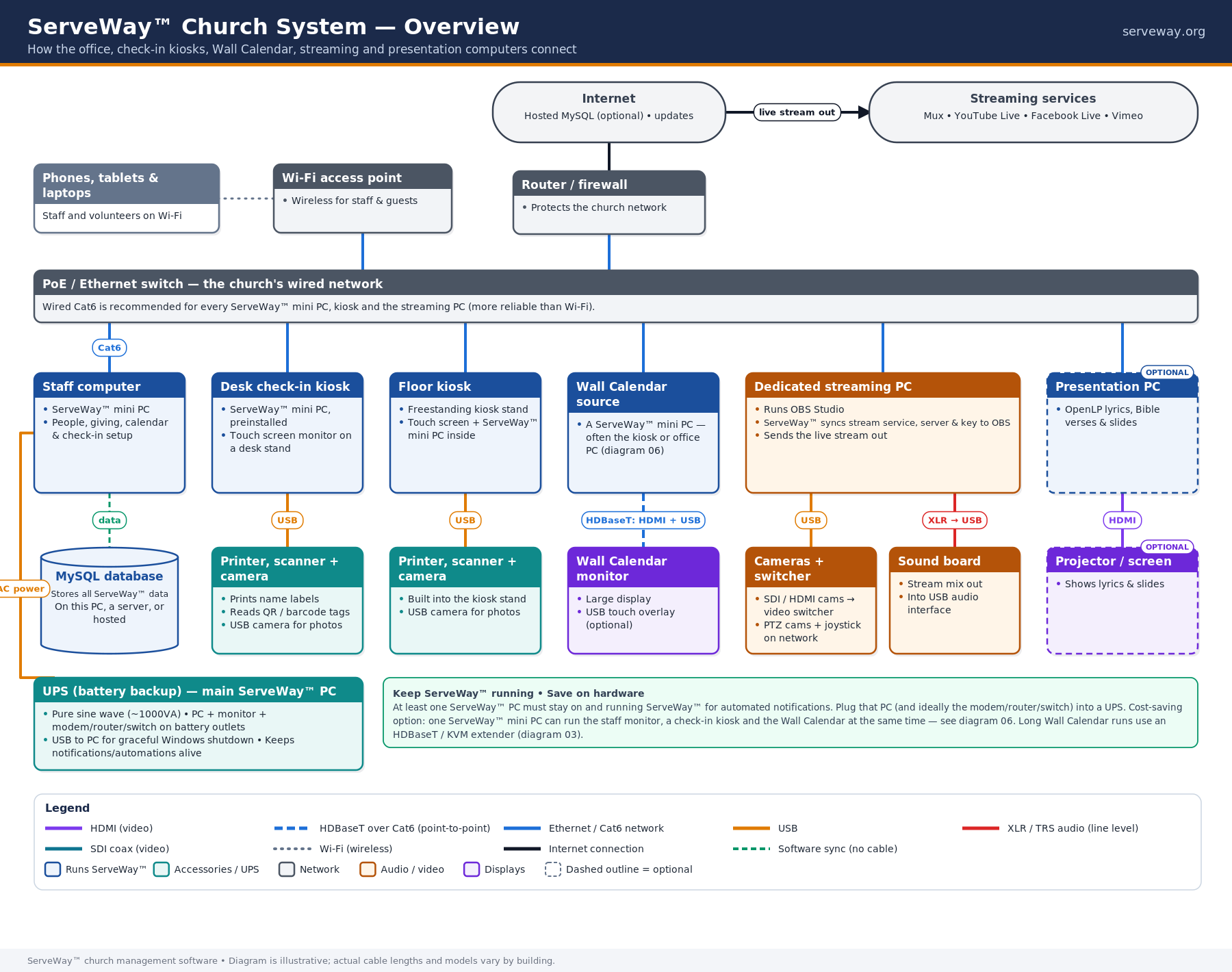
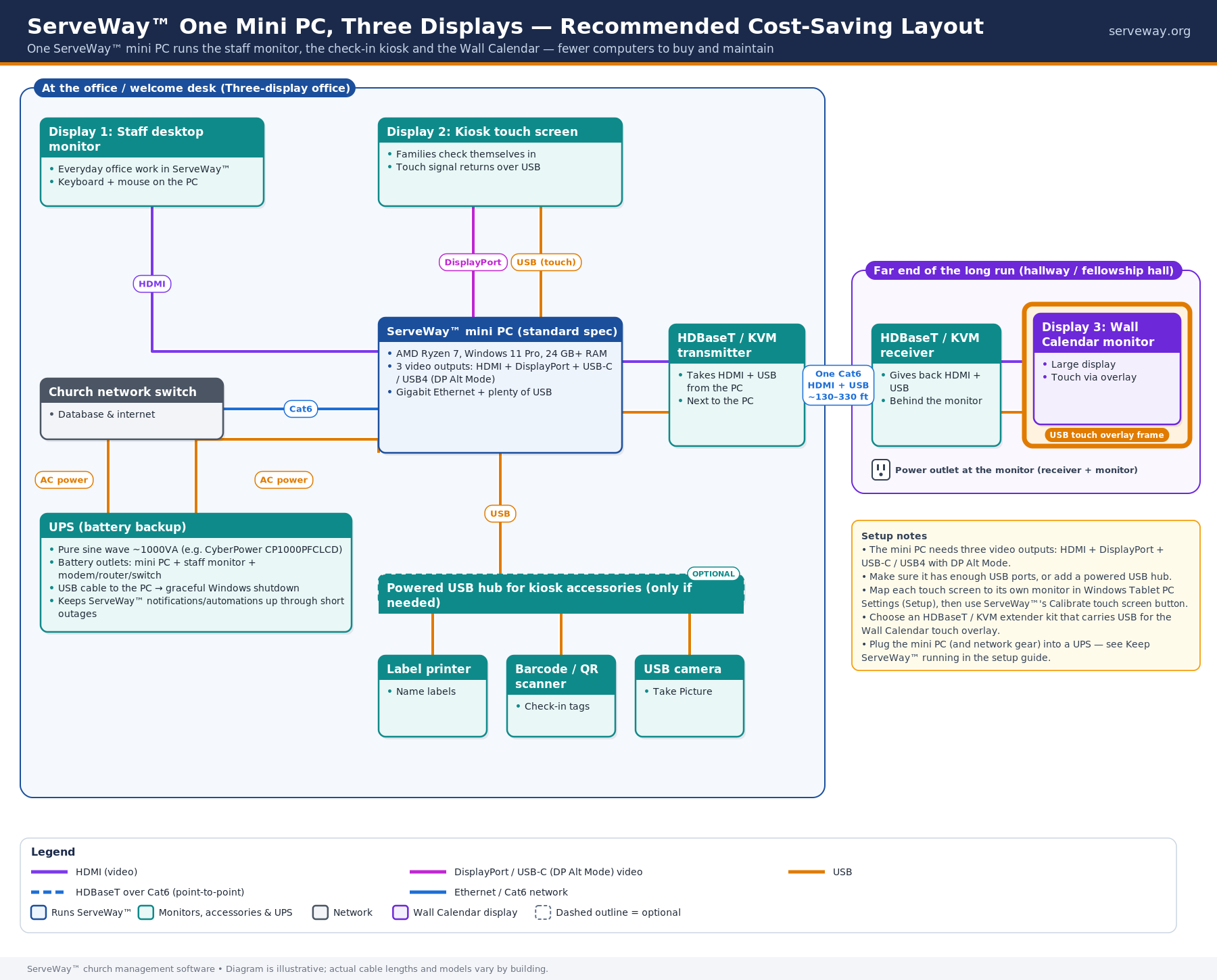
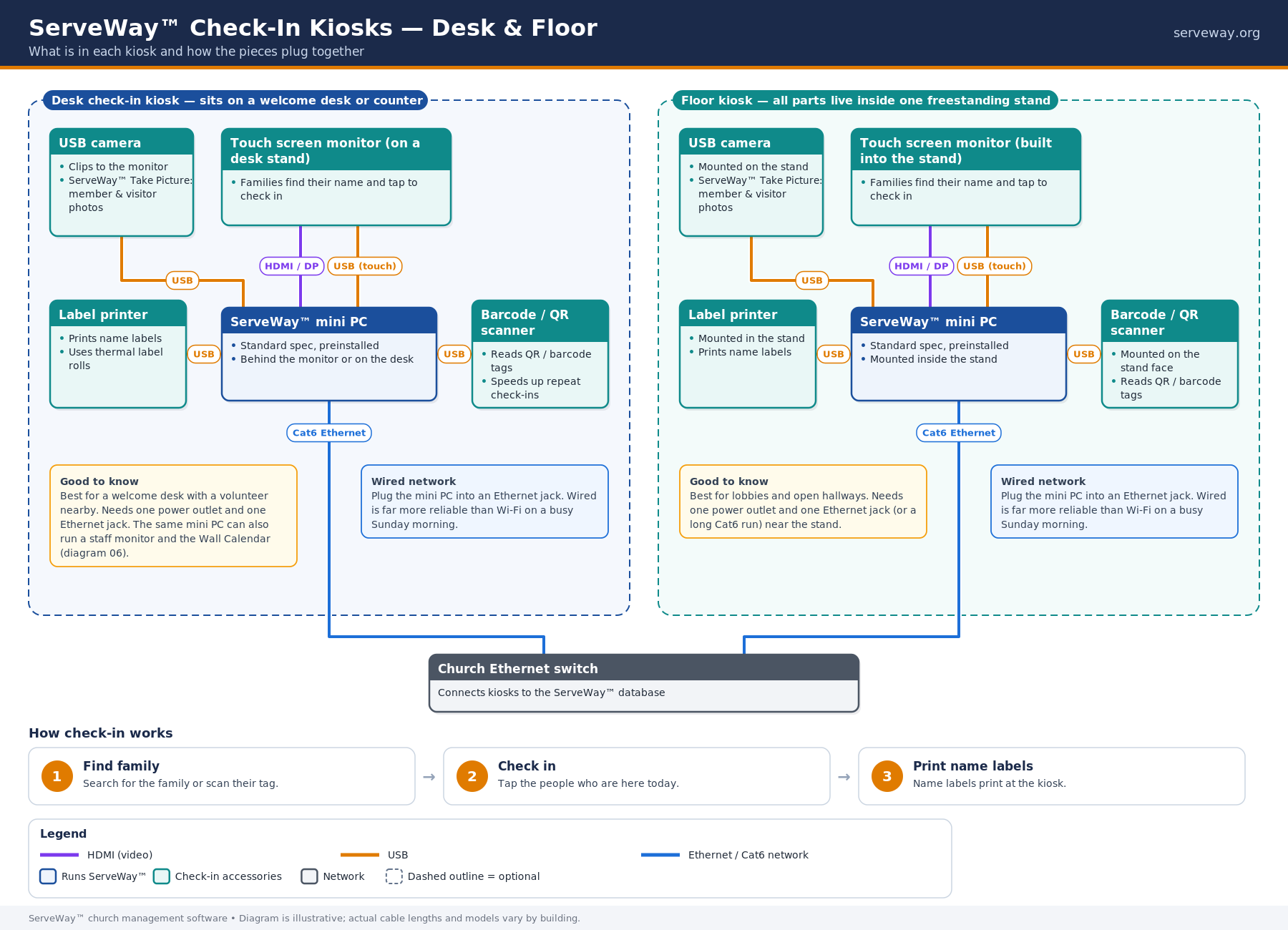
ServeWay™ runs on hardware you already have. We can also supply pre-configured mini PCs with ServeWay™ installed, check-in kiosks that print name tags and security labels, Wall Calendar displays and streaming systems.
- Self-install bundles ship ready to plug in, with ServeWay™ already installed.
- Full on-site installation is available by quote once your cabling is in place. We set up and test the whole system.
- Recommended: one mini PC driving three displays keeps setup simple and costs down.
- Always-on and UPS-ready: automations run on your ServeWay™ PC, so we can include a UPS (battery backup) to keep it running through power blips.
Works with what you already use
- Google Calendar
- WordPress
- Tithe.ly
- OBS Studio
- OpenLP
- MUX.com
- YouTube Live
- Facebook Live
- Vimeo
- Twilio
- Brevo
- PowerPoint & Word
- xAI Grok (optional)
ProPresenter 7 integration
Send your scripture list to ProPresenter, switch OBS scenes to match what’s on screen, and show a nursery pickup code on the screens. Not available yet, and details may change.
Member pages on the home screen
Members will be able to add your church’s member pages to their phone’s home screen, like an app. Member pages already work in any phone browser today.
Help when you need it
- The first year includes tier 1 support and updates, plus 2 hours of hands-on tier 2 help
- A full user manual opens from Help inside ServeWay™, and every help screen can be read aloud
- Custom features and integrations are available by quote
- Built by ServeWay™ Staff and developed alongside a working church's office, check-in and live stream
Try every feature free for 45 days.
When you buy, you keep using the same installation. There’s nothing to reinstall and no data to move.
ServeWay™ is beta software. Features may still change as we improve it. Churches using the beta help shape every release, so tell us what you need on the Support page or by phone.
- 1 year of tier 1 support and updates
- 2 hours of tier 2 hands-on help
- Optional renewal: $49/yr, or $99/yr with 4 hrs of tier 2
- No monthly bill for the ServeWay™ application*